

Home automation means using technology to make devices work automatically. It helps save time, energy, and makes life easier by using sensors, circuits, and simple programs to control things like lights, fans, and alarms.
Here are the answers to the questions from the “Home Automation” chapter of the Class 8 Kaushal Bodh book.
Activity 1 — Exploring Automation
Table 4.1: Automated systems
| Place/Location | What is Automated? | What is Happening? | How Do You Think It Works? | Notes |
|---|---|---|---|---|
| Classroom | Automatic fan/light | Lights and fans turn off when no one is inside | Motion sensor detects no movement | Saves electricity |
| Home | Automatic water purifier | It stops when tank is full | Water level sensor gives signal | Saves water |
| Car | Automatic door lock | Doors lock when car starts | Speed sensor sends signal | Safety feature |
| Market | Automatic sliding door | Door opens when someone comes | Motion sensor detects movement | Easy for customers |
| Railway station | Automatic announcement system | Announcements play automatically | Computer triggers audio | Helpful for passengers |
Reflect on Activity 1
1. Why is automation required?
Ans. Automation saves time, reduces mistakes, improves safety, and saves electricity.
2. What excites you most about automated systems?
Ans. They work on their own without human effort and make life easier.
3. Ideas to make life easier:
Ans. Automatic plant watering, automatic dustbin, automatic classroom light, automatic room freshener.
Activity 2 — Simulation of Circuits
1. Which software did you use?
Ans. I used Tinkercad simulation software.
2. Did your circuits work? Observations:
Yes, circuits worked. When battery voltage increased, LED glow increased. When resistor value increased, LED brightness decreased.
Activity 3 — Building Physical Circuits
1. Which circuit did you make?
Ans.I made an LED with switch and battery circuit.
2. Components used:
- 9V Battery
- LED (5 mm)
- 220-ohm resistor
- Switch
- Jumper wires
- Breadboard
3. Draw circuit diagram:
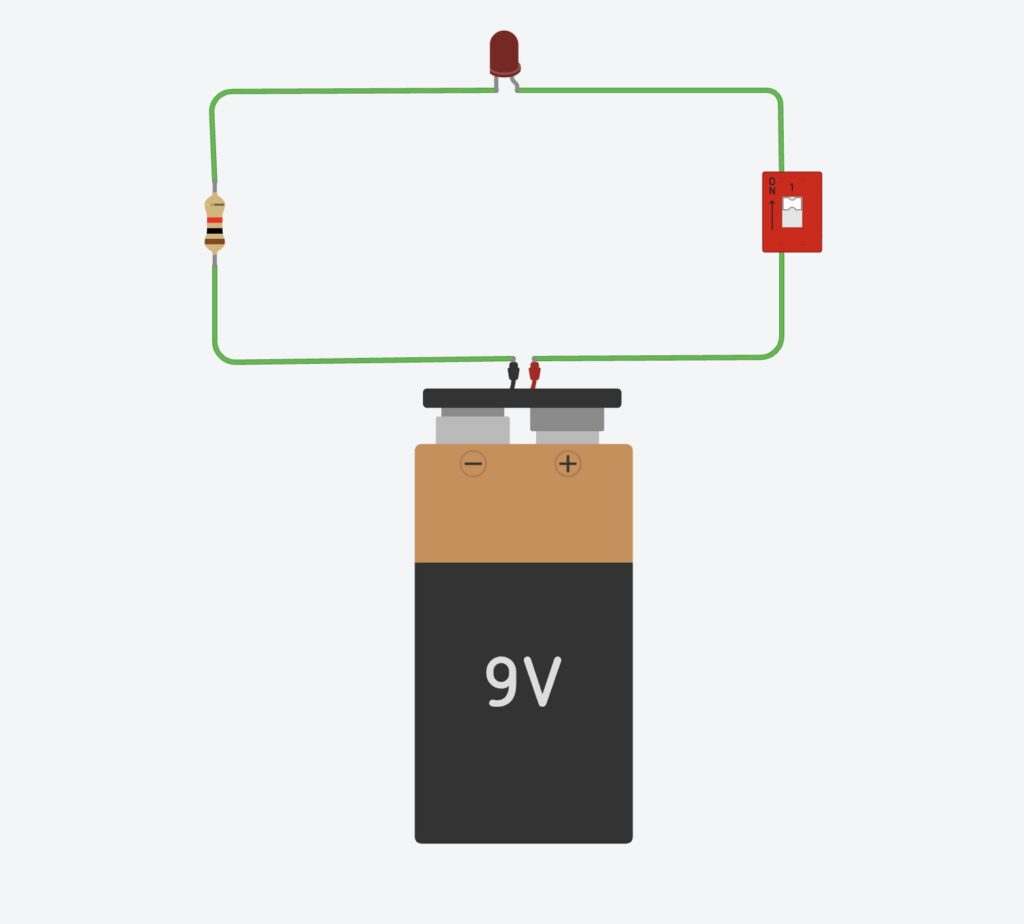
Activity 4 — Input, Process, Output Table
Automatic Water Sprinkler System
| Input | Process | Output |
|---|---|---|
| Moisture sensor senses dry soil | Microcontroller checks moisture level | Water pump turns ON |
Automation Device of Your Choice — Automatic Door System
| Input | Process | Output |
|---|---|---|
| Motion sensor detects a person | Microcontroller decides to open door | Door opens automatically |
Activity 5 — Smart Automation System
Automation System:
Automatic Fan System
Function:
Fan turns ON when temperature becomes high.
Microcontroller:
Arduino Uno
Circuit Diagram:
(Draw Arduino → temperature sensor → fan/LED output.)
Process:
Write simple Arduino code, upload, and test.
Did circuit work first time?
No. I fixed loose wires and corrected pin numbers in the code.
Activity 6 — Make Your Own Automation System
1. What automation system do you want to make?
Automatic Fire Alarm System
Process:
Flame sensor detects fire → Arduino checks value → Buzzer starts ringing.
2. Input–Process–Output
Input: Flame sensor detects fire
Process: Arduino decides if fire level is high
Output: Buzzer rings loudly
3. Materials required:
- Arduino Uno
- Flame sensor
- Buzzer
- Resistors
- Breadboard
- Jumper wires
- USB cable
4. Did you modify code?
Yes.
Source: Arduino fire alarm sample code from online tutorial.
Modification: I changed pin numbers and added LED blinking.